




FAQs
Product-specific FAQs can be found on the product pages. Find FAQs about the new login system here.















Product-specific FAQs can be found on the product pages. Find FAQs about the new login system here.

Licenses can be either Floating or Node-locked.
If a license is Node-locked, then that license can be used ONLY on the machine whose system ID the license is keyed to. If you buy 5 of this type, then you identify 5 machines that will get the licenses.
If a license is Floating, then that license can be used on the machine whose system ID the license is keyed to, but it can also be used (one at a time) by other machines actively networked to it. If you buy 5 of this type, then you only identify the one machine the 5 are all keyed to, and you have 5 licenses to use (simultaneously).
A "Render" license only provides rendering capability and does not allow use of the product in interactive mode. These are typically used for render farms. Although a "Render" license can be floating or node-locked, only node-locked Render licenses can be purchased or rented self-service on the website. Contact sales@thefoundry.co.uk for floating Render licenses.
You can read about our licenses in the Foundry Licensing Tools User Guide.
If you need to transfer a license to another machine, please first read our License Transfer Policy, then complete our license transfer request form.
You cannot transfer any of our products to a different host system. For example, you cannot transfer KEYLIGHT on Avid DS to KEYLIGHT on Final Cut Pro.
Sometimes our software may give you licensing errors on Windows 7, even when the Foundry License Installer (FLI) reported that the license was installed successfully.
This problem appears to happen on Windows 7 because of the extra ProgramData directory - Windows 7 has the same Program Files and Program Files (x86) folders as Windows XP but it also has the new ProgramData folder.
On XP, both NUKE and plug-ins look in C:\Program Files\TheFoundry\FLEXlm for a license.
On Windows 7, The FLI presently installs licenses to C:\ProgramData\The Foundry\FLEXlm only.
NUKE will look in this directory for a license as well as the old one but plug-ins such as OCULA for NUKE or CAMERATRACKER for AE, and NUKEX features (which are effectively plug-ins) only look in the old C:\Program Files\The Foundry\FLEXlm location.
Therefore, if you only have license files in C:\ProgramData\The Foundry\FLEXlm, plug-ins and NUKEX features will not be able to find your license.
You can solve this problem by copying your license file(s) (these will have a .lic extension) from
C:\ProgramData\The Foundry\FLEXlm
to
C:\Program Files\The Foundry\FLEXlm
Please note that in order to see the ProgramData directory in Windows Explorer, you have to turn on "Show Hidden Files and Folders" in the Windows Folders and Properties - View options.
Please note that if you are using 32-bit plug-ins then you will also need to copy the .lic file to
C:\Program Files (x86)\The Foundry\FLEXlm
There is an issue with OS X 10.8 (Mountain Lion) and some of our products that causes the valid FLEXlm SystemID for a machine to switch back and forth between MAC addresses for the machine, resulting in valid licenses being reported as invalid. This problem can affect NUKE and NUKEX, FURNACE, FURNACECORE, CAMERATRACKER, KEYLIGHT, KRONOS and ROLLINGSHUTTER.
If you encounter this problem then please generate the diagnostic output from the Foundry License Utility (FLU) from the machine affected and contact our Support team.
We will be able to reissue a license to enable you to avoid the problem once we verify that OS X 10.8 (Mountain Lion) is the cause.
Some newer Linux distributions (notably Fedora 15/16 and RHEL 6.1) have changed the way network devices are labeled.
This new method, called Consistent Network Device Naming, names the devices em1, em2 etc. according to their physical position in the machine rather than the older naming method of eth0, eth1 etc. after the order they are polled when the machine starts up.
Currently our software looks for the eth0 address when validating licenses so this can result in an "Invalid SystemID" error message if your operating system uses the new method. This can prevent the software from getting a license.
We will be updating our software to adapt for this change but as this will take time, you can revert to the previous standard with the following steps.
You should then be able to license your software.
Please make sure that you back up any system files before making changes and please ask your SysAdmin for assistance if you are unsure about editing these files.
Please feel free to contact the Support team if you have any questions about this.
OpenFX is an open standard for visual effects plug-ins. It allows plug-ins written to the standard to work on any application that supports it. The long term aim of the project is to allow visual effects plug-ins to be written once and run on any host application. This avoids the current per application fragmentation of plug-in development and support, which causes much heartache to everyone, plug-in developers, application developers and end users alike.
The Foundry has been at the heart of creating OpenFX, co-ordinating the various interested parties and doing most of the work to develop the standard. We are also actively pushing the standard and overseeing its refinement and expansion.
Currently supported host systems are:
Please see the release notes for information about the supported host system version for our plug-ins.
Autodesk 2012 Systems are unsupported.
A fix for Lion users encountering a 'crash on open' bug is available from NUKE 6.3v3 onwards.
A fix for FLEXlm issues on Lion is now available in FFT 5.0v3.
There is a problem with the color pickers in FCP 7 on Lion that affects KEYLIGHT performance. Our plug-ins for Final Cut Pro are unsupported on Lion at present.
Trouble: MODO will not install on Windows
Solution: The Production/Creation COLLECTIVE Installer should be run with Administrator privileges. To do this, right-click on the executable and select “Run as administrator”.
Trouble: Only NUKE will install on Linux
Solution: Your machine is missing the xterm component. Close the Installer and execute the following in the terminal (without quotes): "yum install xterm”
We've moved all purchasing and trials for MODO products from the Community to our main site here. This means you now purchase MODO, MODO kits/plug-ins/training/compatible products and trial MODO on The Foundry site.
Your online MODO purchases will be stored in your account on The Foundry instead of your account on the Community.
You can no longer purchase MODO from the Community. This has has been moved to the main site MODO pages to sit along side all The Foundry products.
This allows us to provide a single location and download experience for all of your purchases from The Foundry.
Your software, licenses, plug-ins and training have all been moved under your account on this website. They are now available on your My Products page in your account.
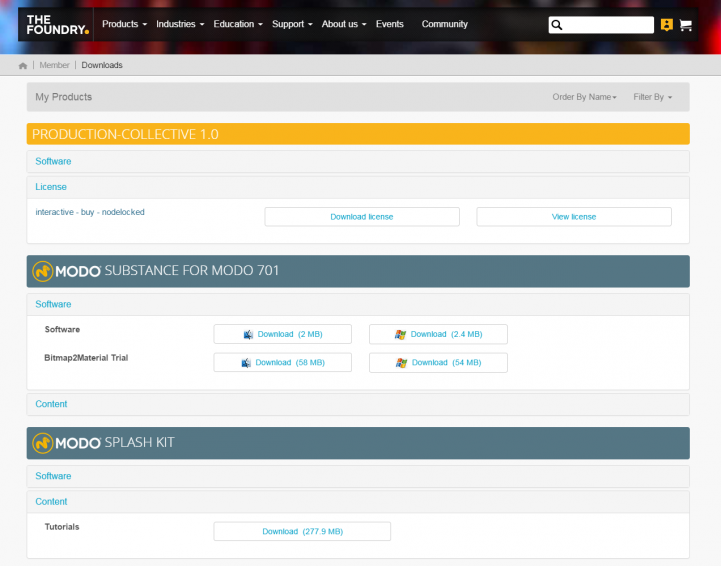
Only web purchases made through The Foundry or Community store will be in your online account. Any licenses that were not purchased on the website will not be in your account at this stage.
All products that were available through the Community store can now be found under the MODO section here:
https://www.thefoundry.co.uk/products/modo/plugins/
https://www.thefoundry.co.uk/products/modo/kits/
https://www.thefoundry.co.uk/products/modo/training-videos/
https://www.thefoundry.co.uk/products/modo/compatible-products/
MODO Trials and Production Evaluations are available through the main site here.
These are not available on our website but can be added to your account manually by our sales team. Please contact sales@thefoundry.co.uk for assistance.
Unfortunately these serial codes will no longer be valid. However, we will of course provide you with a new serial code to be registered on The Foundry website. Please contact licenses@thefoundry.co.uk with your current Serial Code and we will issue you with a new code.
MODO ONLY educational licenses are no longer available to purchase. However, we now offer the Creation COLLECTIVE (MODO, MARI & HIEROPLAYER) for the same price. To purchase an educational license please contact education@thefoundry.co.uk
This remains on the Community pages here. This is where you will find Help, Assets & Forums.
If you are in the UK you will pay standard UK VAT. If you are in the EU and provide a valid VAT number, you will not be charged VAT. If you are in the US, you will be charged State tax.
Yes. We've added PayPal as a payment option. You'll see this once you click through to the order confirmation page during checkout.
We have just started the transition of merging our Community website and The Foundry website. We are merging the sites to improve your purchase experience and enable you to manage your licenses in one place. In order to do this, we need our customers to have one place to sign in, which is why you have been re-directed to The Foundry login page from our Community site.
At this point very little. The only difference you will see at the moment is the single login page.
If you registered an account on both the Community site and The Foundry site, these have now been merged. The password you should use is the password you created for The Foundry website. If you have any problems logging in with your password you can reset it here using the link provided on the login page.
No. If your accounts are associated to 2 different email addresses they will not have been merged. You can login to both accounts separately with the usual passwords associated with each account.
Not at this point, but this is something we will look into in the future.
At this point you may not see all products in your online account. Your MODO related products will remain in your Community account and any products purchased on The Foundry website will be in The Foundry account. We are working on having your licenses managed online in one place and this will be an available feature in future.
Yes. You should self register your purchase as usual here: